Datagpt
DataGPT lets business teams ask questions about their data in plain English and get answers with charts, drawn from their own data warehouse.
My role
Solo product designer
- Discovery and stakeholder interviews
- Personas and competitor mapping
- Prototypes and usability testing
- UI, design system, developer hand-off
- Pilot and post-release testing
- Website, promo videos and marketing materials
Team
- Product owner
- Product manager
- Engineering team
Problem
Dashboards showed what happened.Nobody could simply ask why
Business context
Companies spend heavily on BI tools, but getting from data to a decision still went through a data team. Dashboards were static, and business users couldn't ask follow-up questions.
User pains
Executives waited for the next meeting to learn why revenue moved. Analysts were "drowning in ad hoc requests". Marketers pieced a story together from dozens of reports.
Goal
Let anyone ask a complex question in plain English and get an answer they can trust.
Executive
Why did revenue drop? I don't want to wait for the next meeting for answers. Revenue opportunities are going missed.
Data team
We spend so much time on dashboard building and maintenance, and next week the questions change.
Analyst
We are drowning in ad hoc requests.
Discovery & Research
Traditional BI was too slow and too complex for everyday decisions
I started with stakeholder interviews and a review of the conversational-analytics market. Executives, data analysts, marketers and product managers described the same problem. They wanted answers when the question came up.

- 30+stakeholder interviews
- 4user types synthesised
- 4competitor groups mapped
Outcome
Lag time
Insights arrived days late. By the time a dashboard was built, the question had changed.
Accessibility
Only BI experts could drill deeper. Business users felt locked out and sent ad hoc requests instead.
Context switching
People pieced a story together from dozens of reports instead of simply asking "Why did X happen?"
Two groups: the people who ask questions and the people who make answers possible
Most users only ask questions. A smaller group connects the data and defines what the metrics mean. DataGPT had to serve both.
Executive
Asks questions every dayVP or C-level. Owns revenue and growth targets. Lives in meetings and Slack.
Why did revenue drop last week?
Need
The cause, not a chart, and before the next meeting.
Frustration
Dashboards show what happened. The why goes into the data team's queue.
Growth or marketing manager
Asks questions every dayRuns campaigns and channels. Compares periods and segments several times a week.
Which channel drove signups this month?
Need
Quick comparisons by period, channel and segment, without learning a BI tool.
Frustration
Dozens of reports to piece together and a queue for anything custom.
Data analyst
Asks questions every dayMid-size SaaS company. SQL, BigQuery, Tableau, Python. Spends 40–50% of their time on repetitive reporting.
Show retention by segment for last quarter.
Need
Fewer repetitive pulls and consistent metrics across teams.
Frustration
Constant Slack requests. Rigid BI tools. Every team defines KPIs differently.
Data engineer
Makes the answers possibleOwns the warehouse: BigQuery, Snowflake or Databricks. Maintains pipelines and data models.
What does "conversion" mean to the AI?
Need
Connect sources and define tables, metrics and dimensions without custom code, and control refresh schedules.
Frustration
Every new business question means a new model or dashboard to build and maintain.
Competitor mapping
Many "AI analytics" tools, few that explain why
We compared conversational analytics tools, from large BI suites to new AI startups:
ThoughtSpot
An early pioneer in natural language search for data. Great at connecting to various data sources, but NL Q&A yields only single charts and requires pseudo-code-like queries. Users often have to iterate question by question, without deeper “why” analysis.
Power BI + Copilot
A powerful BI suite with new AI features, yet its natural language Q&A felt limited. It often misunderstood nuances (synonyms, time phrases) and struggled with multi-step questions. The heavy interface (PowerQuery, DAX formulas) meant a steep learning curve for non-analysts.
ChatGPT Plug-ins & SQL Bots
Dozens of text-to-SQL startups promised to translate questions to SQL. In reality, none could handle enterprise-scale data or complexity – they’d break on big data volumes, or return only basic facts. Hallucinations (made-up answers) were a serious risk.

Outcome
Comprehension without depth
Most tools could parse a question but returned "what happened" charts. Nobody went on to "why" and "what next" in the same conversation.
Depth without accessibility
The powerful options needed modelled datasets, DAX or SQL. They were built for analysts, not the people waiting on them.
Trust was the open gap
Black-box answers and hallucinations were the main objection. Showing the source of every answer became a design requirement, not a nice-to-have.
Chat or dashboard?
I prototyped two interaction models and we shipped a hybrid
Before committing to a direction, I tested two ways for people to work with their data through AI.

Pure chat
Model AAsk in natural language and get a written summary with charts. Fast and approachable, for non-technical users.
“Where is this data coming from?” “How do I verify this?”
Simple but not trustworthy.
Data Navigator
Model BA structured environment: pick metrics, filters and dimensions to build a query. Full control and full transparency.
“Safe but rigid.”
Good for precise queries, too slow for ad hoc exploration.
Chat + Data Navigator
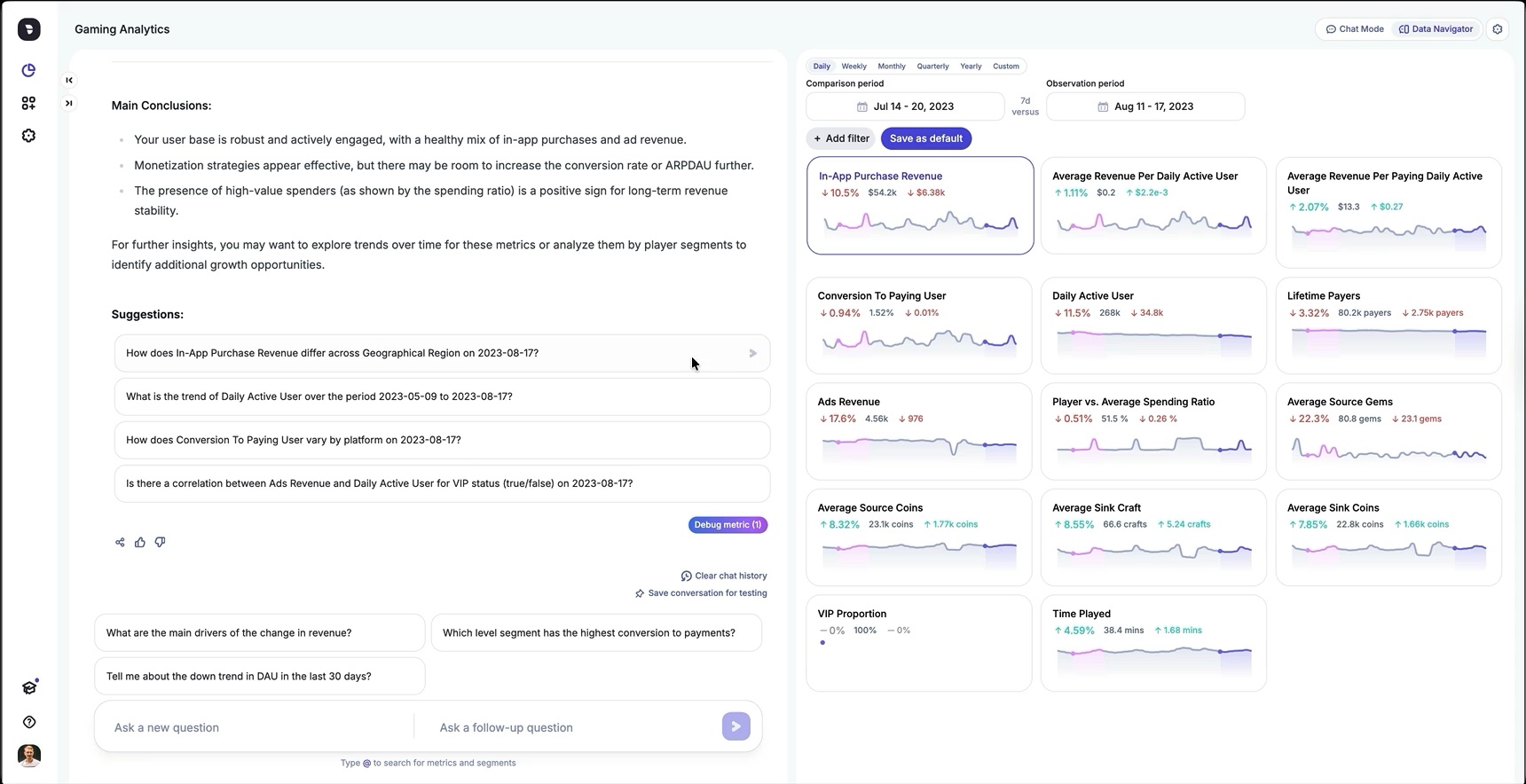
ShippedOne screen, two ways. Type "Why did revenue drop on Friday?", or click Revenue and then Friday in the navigator, whichever feels easier.
Easy to start, and still able to answer open-ended questions.
What shipped?
AI analyst to talk to
A conversation with a data analyst who knows business
User asks a question and DataGPT replies with a short written answer, a table and charts. Every answer states its date range and comparison period. Suggested follow-ups keep the analysis going.
- Daily "Today’s summary" of what changed
- Dataset guide listing key metrics and dimensions
- Type @ to search for metrics and segments

For people who prefer to explore on their own
A metric dashboard that's always one click from the chat. Each metric card shows the change between the comparison period and the observation period, and any card can be sent back to the chat as a question.
- Chat Mode and Data Navigator side by side
- Daily, weekly, monthly, quarterly, yearly or custom periods
- Filters saved as defaults per databoard

Data teams set up DataGPT without code
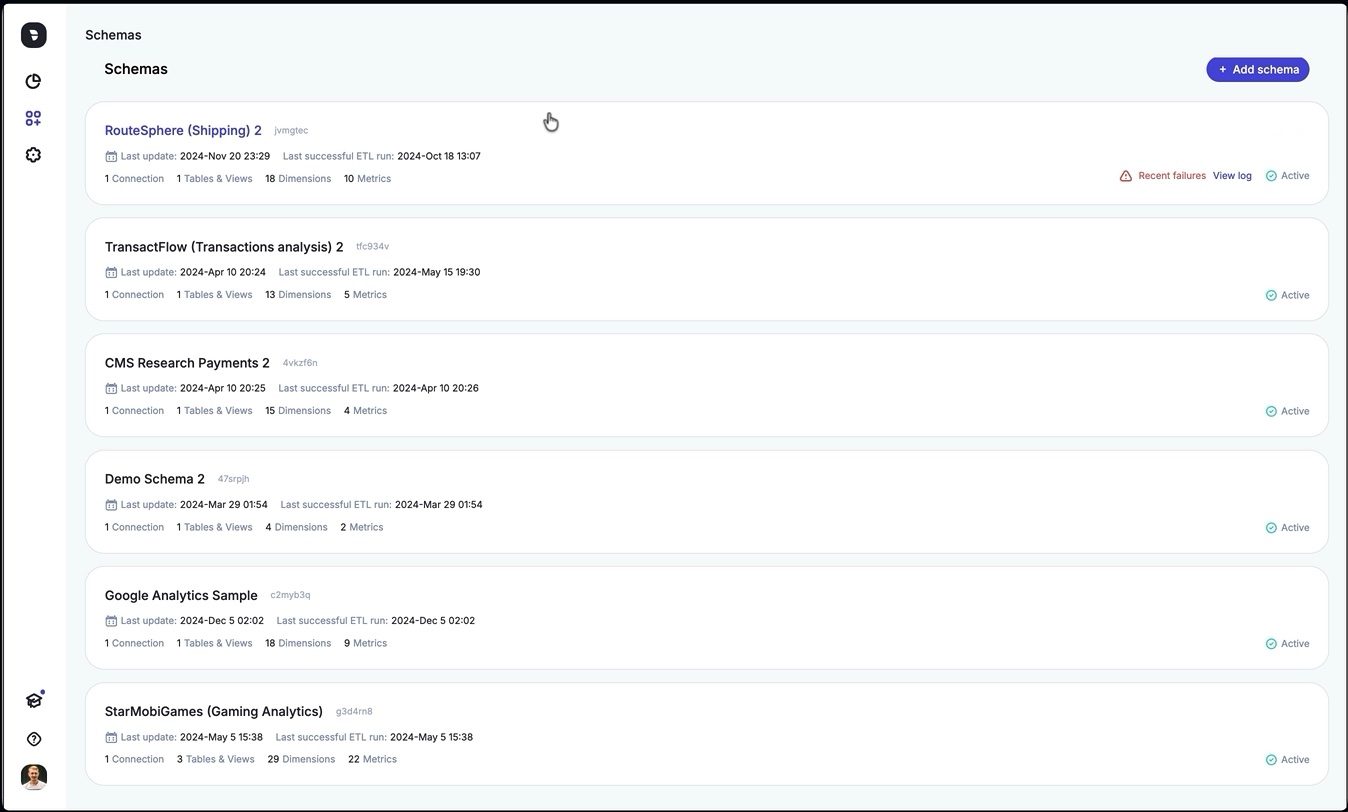
Admins connect a data source, set the ETL schedule and history length, and describe the company and its data. Each metric and dimension is a row they can edit, with a description, a format and synonyms. "Conversion rate" can also be "CR" or "conv rate".
- Connections to BigQuery, Snowflake, Databricks
- Version history, SQL import, upload and download
- The schema is what makes answers use the company's own terms
Three layers, documented in Figma
Every component shipped with interaction states, usage guidelines and behaviour rules. Engineers could build new features, from conversation flows to charts.
- Base tokens
- Core components
- Analytical components

Pilot launch
After launch we surfaced two problems
We rolled DataGPT out to a small group of pilot customers, including Papa John's, to test usability, accuracy and fit with their workflows before full release. I ran testing during the pilot and again after release.
1 Problem
Ambiguous questions got confident but wrong answers
Signal
Pilot users often phrased questions in ways that could be read more than one way.
What's my best-selling product?
Coffee is your best-selling product.
Cause
"Best-selling" could mean most units, most revenue or highest margin. The model picked units, while the user meant revenue. The answer was technically correct but wrong for the question, so people had to rephrase or ask follow-ups, and insights took longer.
The fix was LLM instructions (skills)
I designed a way for admins to add business logic and definitions in the Schema Editor. For example, "conversion" means the conversion-rate metric, and "best-performing product" means highest revenue.
Results
- −64%Ambiguous queries (requiring clarification or rephrasing)
- +58%First try query Success Rate
- +41%Average session depth (queries per session) grew by
- 2m to 30sAverage Time to Insight
2 Problem
Users couldn't see which dates and filters an answer used
Cause
The date picker and filters lived only in the Data Navigator. When it was collapsed, they disappeared. "Show me revenue" might use "last 30 days", and nothing in the chat said so. The numbers were right, but the missing context made people doubt them.
Fix
A persistent global header above both Chat and Data Navigator:
- Moved the date picker and filter chips into a top bar.
- Kept them in sync between Chat and Navigator.
- Added subtle motion when dates or filters change.


Results
- +27%Conversation satisfaction (thumbs-up ratio in chat)
- 58%Engagement Retention
- 89%Context Visibility Confidence (post-chat data clarity check)
Impact first year
$0 → $1.5M ARR
DataGPT's first year: 20% month-over-month revenue growth and zero customer churn in the last six months.
Director of Growth, Plex
Other BI tools show you what happened. DataGPT helps you understand why and what to do about it. It's like having a personal data analyst at my fingertips.
Customers reported a 60% average reduction in pending data requests. Teams that used to wait days for an answer got insights daily, even hourly. Adoption spread on its own: departments outside the original use case started using DataGPT, because it needed no training. You just ask a question.
International Analyst, Papa John's
With DataGPT, we finally have a more complete view of our retail data across web and app, giving us a clear view of customer journeys, purchase behaviours, and product performance, all in one place.
In the UK division, DataGPT became a standard part of weekly executive meetings. Automating daily and weekly performance summaries freed analysts from more than 20 hours of manual reporting a week and got insights to marketing and operations faster.
Marketing
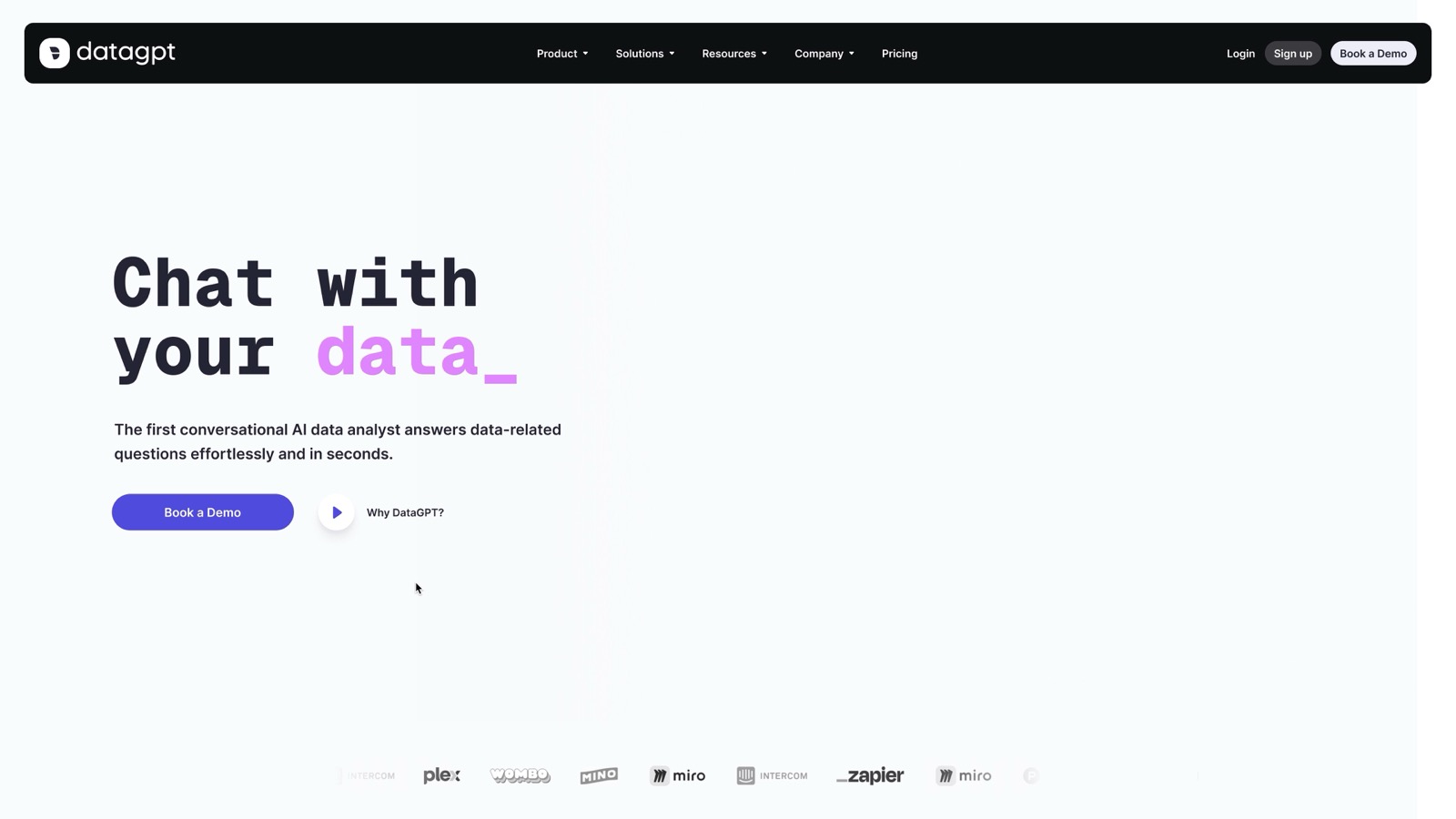
Website
I designed the website, the promo videos and the marketing materials. The site shows a demo conversation with DataGPT.
Conclusion
DataGPT started as a chat concept. It shipped as one screen where technical and non-technical users ask a question, see which data and dates the answer used, and check it in the Data Navigator.
Three changes came out of testing
Hybrid insight view
Allowed users to explore metrics and follow up through conversation within the same screen.
Schema level LLM instructions
aligned AI responses with business terminology, cutting ambiguous interpretations by 64%.
Date range presets
Saved date ranges for recurring analyses, shown above Chat and Data Navigator.