Designed and launched a no-code contact center from scratch. Scaled from MVP to a core SaaS product.
Voximplant Kit is a cloud contact center with a drag-and-drop scenario editor and AI call automation.
My role
Only designer for the first 1.5 year, then lead when a second designer joined.
I owned the product end to end:
- Discovery and interviews
- UX Research
- Competitive Analysis
- Prototypes and usability testing
- UI, design system, developer hand-off
- Post-release testing
- Led the promo/marketing materials
Team
- Product designer
- Product manager
- Product analyst
- Voximplant engineering
Problem
Setting up a contact center on Voximplant needed developers
Business context
Voximplant is a cloud communications platform with voice, video and messaging embedded through APIs and SDKs. But its customers' contact-center teams are not developers.
“Setting up a contact center required complex code and dedicated developers, lengthy delays, and high development costs.”
User pains
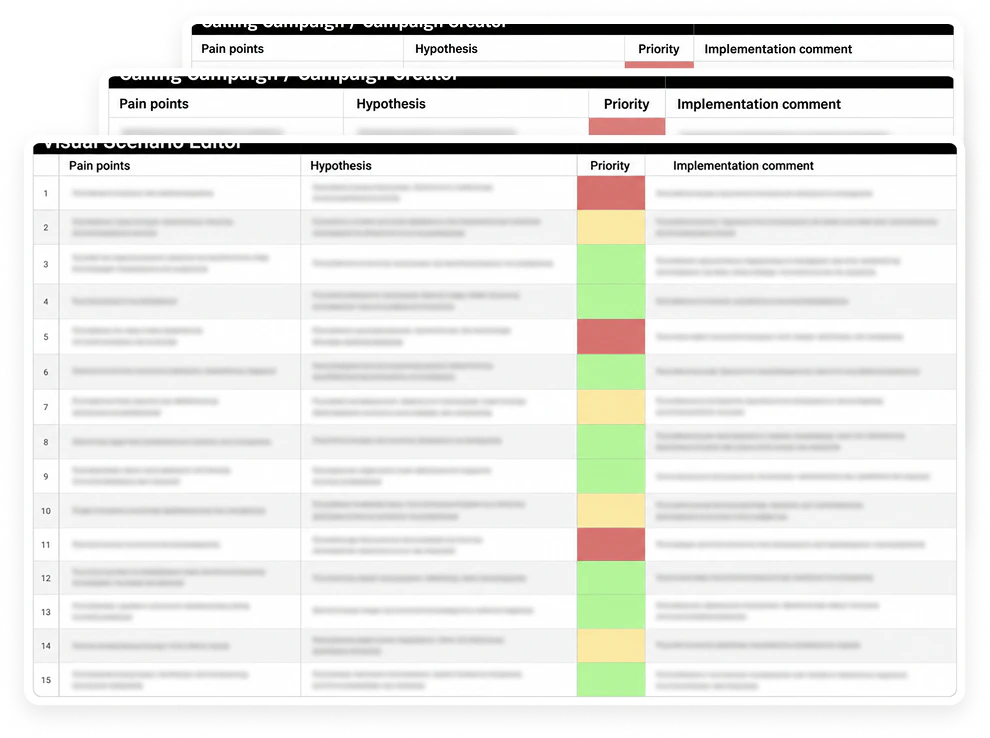
Kit existed as a rudimentary MVP. Interviews with current and potential users gathered every pain point and barrier, and were paired with a hypothesis and a priority.
Two audiences had different needs: the business that buys and configures the product, and the agents and supervisors who live in it every day.
Process
Discovery
Research
With the product manager, I built user portraits from the interviews, then buyer personas. Later I ran usability tests on the MVP and interviewed call-center managers to validate the flows and the terminology.
I put every finding into a table, one per product area, and compared Kit with competitors.
What I did
- Interviews with current and potential users, by product area
- User portraits, then buyer personas
- Usability tests on the MVP
- Interviews with call-center managers on flows and terminology
- Competitive analysis with PM
Who is user
The interviews split the audience in two:
- People who buy and set up
- People who work in it every day
Each group had different tasks and different problems, and the product had to serve both without a developer in between.
Operations or customer-service lead
Small and mid-size company, 10 - 200 people. IT services, finance, education, delivery, retail, car dealers.
Need
A working contact center in days, not months, without hiring developers. Predictable pricing.
Current approach
Custom code on the platform, a dedicated engineer, months of delay and a large bill.
Marketing specialist
Marketing or operations specialist who designs IVR menus and outbound campaigns. Not a programmer.
Need
To build call logic, check it and change it without waiting for engineering.
Current approach
Logic lived in code. Every change was a ticket, and the only way to test is to publish and call the number.
Supervisor
Runs the team: queues, shifts, quality and reporting.
Need
A live view of every call and chat, a way to step into a conversation, and reports by agent and queue.
Current approach
Calls and chats in separate tools, so no single view of the team and no way to coach in real time.
Agent
Handles calls and messages all day across phone, SMS, Whatsapp, Telegram, Messenger, Viber and web chat.
Need
One call and message interface for every channel, the customer's details, and a fast transfer.
Current approach
A different tool per channel and no shared customer profile.
Competitive analysis
We benchmarked Kit against the products a small or mid-size company would choose across the workflow for a non-technical team: setup and learning curve, the visual scenario editor, outbound campaigns, channels, entry price, and best fit.
Six products covered: developer platforms (Twilio Flex, Amazon Connect), enterprise suites (Talkdesk, Genesys Cloud CX), an outbound specialist (Five9), and a cloud phone system (Aircall).
| Product | Setup and learning curve | Visual scenario editor | Campaigns | Channels | Entry price | Best fit |
|---|---|---|---|---|---|---|
| Twilio Flex | A programmable platform: developers build the contact center on it. Implementation projects start around $10k. | Twilio Studio: strong no-code/low-code flow builder for IVR and SMS. | No native campaign tool. Outbound is built with APIs or partners. | Voice, SMS, WhatsApp, chat and more through Conversations. | $1 per active user-hour or $150 per user/month, plus usage. | Teams with developers who want full control. |
| Amazon Connect | AWS account and console. Fast if you know AWS. | Contact flow editor: drag-and-drop, capable. | Outbound campaigns added in 2021, priced for high volume. | Voice and chat; SMS and other channels came later. | Pay as you go, about $0.018–0.038 per minute, no seat fee. | Teams already on AWS with cloud engineers. |
| Talkdesk | Sales-led. Contracts, historically with multi-year minimums. | Talkdesk Studio: low-code flow designer for admins. | Dialer sold as an add-on. | Voice in the base plan; digital channels as an add-on. | From $75 per user/month in 2021, $85+ later. | Mid-market teams that need deep CRM integrations. |
| Genesys Cloud CX | Enterprise rollout. Powerful and long to learn. | Architect: full flow builder for voice and digital. | Built in: predictive, progressive and preview dialing. | All channels, but only from the CX 2 tier. | $75 (voice) to $115 (omnichannel) per user/month. | Large contact centers. |
| Five9 | Sales-led onboarding. | IVR designer, voice-centric. | The strongest dialers: predictive, power, preview. | Voice first; digital channels on higher tiers. | From about $149 per user/month. | Outbound-heavy sales and collections teams. |
| Aircall | Self-serve, set up in minutes. | Drag-and-drop IVR menus only. No scenario logic. | Power dialer for call lists, no campaign automation. | Voice and SMS. | $30–50 per user/month. | Small teams that mostly take calls. |

Outcome
The gap is in the middle
- Platforms had strong flow builders but assumed engineers and an implementation project.
- Phone systems were self-serve but stopped at IVR menus.
- Nobody offered a full scenario builder that a non-technical person could use on day one.
Price
- Enterprise suites started at $75–150 per seat with contracts and sales calls.
- Pay-as-you-go platforms looked cheap but needed engineers.
- A self-serve product at around $45 a seat would sit below the enterprise floor without hiding a services bill.
Call campaigns
- Campaigns were an add-on at Talkdesk, a build-your-own at Twilio, and a higher tier at Genesys.
- Digital channels were tiered the same way.
- Only the outbound specialists had dialers built in, and they were voice-first.
What it meant for Kit
- Onboarding had to include a number buying and templates, so a first campaign was possible in one session.
- The editor had to match the developer platforms on power and beat them on learnability.
- Campaigns had to be a core flow, not an add-on.
- Every channel had to land in one agent workspace in the base product, not in a higher tier.
Process
Ideation
Hypotheses that shaped release 1
Every interview finding went into one table per product area.
- 01Call logic should be in a visual editor rather than written in code, so a non-technical user can build branching call scenarios.
Create visual scenario editor.
- 02If a scenario can be run inside the editor, users will find errors before they publish.
Add test mode.
- 03When new scenarios start from templates, the first campaign launches faster.
Add template gallery: meeting confirmation, order confirmation, NPS, CSI surveys etc...
- 04If campaign setup as guided sequence, users will not need help with contact lists and variables.
Create four-step campaign creator: strategy, contacts, variable mapping, summary.
- 05If buying a number add to onboarding, users will not hit a dead end later.
Add numbers, to onboarding flow.
IA and structure
I structured and validated the information architecture, confirmed the core functionality with the team, and mapped primary and secondary flows for every key interaction. A user-story map set the priorities for the first release.

Prototyping and usability testing
Clickable prototypes covered full journeys, from the start page to password recovery: 10+ core pages with 30+ screens each. Testing ran in two formats. Corridor tests inside Voximplant gave fast answers on single screens. Moderated sessions with current MVP users, potential customers and call-center managers covered whole tasks: build a scenario, launch a campaign, handle a call.

What changed after testing
- Terminology. Labels for queues, skills, scenarios and campaigns were validated before they went into the UI.
- Test mode inside the editor was validated in sessions, replacing the old routine of publishing a scenario and calling the number to check it.
- The canvas was confirmed over a step-by-step form.
- Every flow was validated before visual design started, so UI work did not reopen structure.
- 10+core pages prototyped
- 30+ screens each
- 2test formats
- corridor tests and moderated sessions
- 15+participants
- current MVP users, prospects and call-center managers
- ≈87%task completion
- unassisted, on the redesigned flows in the final round
Key decisions
A canvas, not a form builder
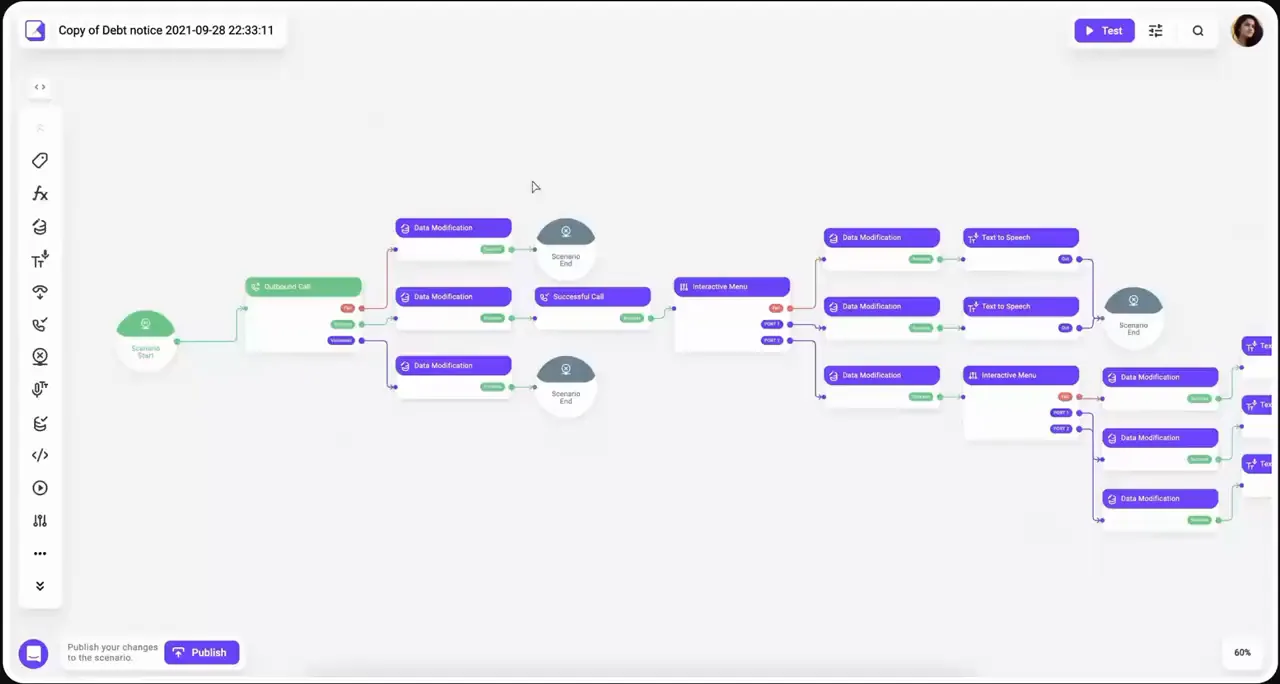
- Real call flows branch: verification, IVR menus, hand-offs, voicemail detection, retries.
- A canvas keeps large scenarios readable. A step-by-step form hides the logic.
Impact
A non-technical team launches a contact center in ≤ 30 minutes (Voximplant).
Five enterprise clients: Rappi, KFC, Burger King, Hyundai, Jaguar run production call flows built on the canvas
Test mode inside the editor
Simulation highlights the active block in real time. Users test a scenario in the same place they build it, without publishing it first.
Impact
Validated in usability sessions with call-center managers before visual design. After launch, users reported better task completion and faster onboarding on the redesigned flows.
Templates before a blank scenario
Ready-made scenarios for common business goals — meeting confirmation, order confirmation, NPS and CSI surveys — so a first campaign starts from a working flow.
Impact
Skyeng runs 20,000 automated outbound calls a month on templated campaigns, with a 17% average lift in call volume.
Automated outbound engagement is up to 50% higher and 30% more cost-effective than human calls (BusinessWire).
Solution
Solution
Onboarding
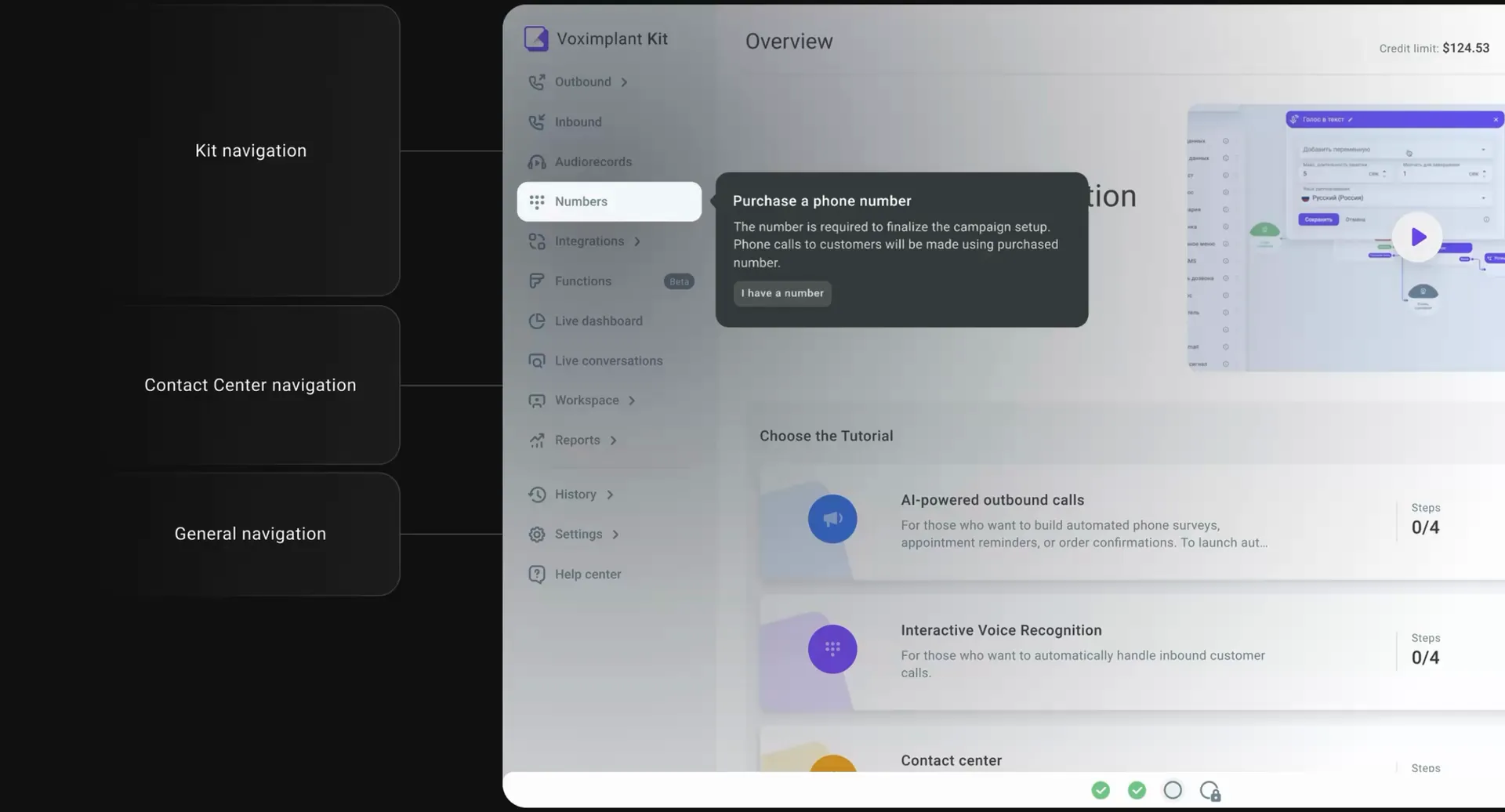
- The first screen after sign-up asks one question: what did you come here to do?
- Three guided tours — AI-powered outbound calls, interactive voice recognition, and the contact center — take four steps each, and the tour a user picks becomes their first task.
Visual scenario editor
- Users build a scenario, the call flow, on a canvas from blocks: speech-to-text, text-to-speech, interactive menu, data verification, call forwarding, HTTP request and more.
- Blocks connect with lines, so a large inbound or outbound scenario stays readable. An onboarding tour shows how to make the first connection.
Editing blocks
- Each block has its own settings: variables and stop words for speech-to-text, skills and priorities for call properties.
- A context menu with shortcuts, colour coding and lock/duplicate keeps large scenarios manageable. Version history and autosave protect every change.

Scenarios and templates
- Scenarios are stored in folders and can be copied and shared.
- New scenarios start from a template gallery — meeting confirmation, order confirmation, NPS and CSI surveys etc... instead of a blank canvas.

Automated call campaigns
- Campaigns run outbound calls at scale without an agent on each call: surveys, reminders, confirmations and announcements, from a scenario, on a schedule or a trigger.
- Setup takes four steps: call strategy, contacts, variable mapping, summary.
- Each campaign reports its results in real time.

Numbers
- Buying a virtual number is the first onboarding step: it enables outbound campaigns and inbound calls.
- Country, region, category, capabilities and price are in one dialog.

Solution
Contact center
One cloud contact center for every channel. Calls and chats from WhatsApp, Telegram, Messenger, Viber, SMS and web chat come into one workspace, and routine work is automated.

Live dashboard
- Real-time statistics on calls and agents: missed and handled calls, answer, hold and handle times, service level, and agents in the queue by status.
- Supervisors use it to track team performance and automation results.

Live Conversations
- Supervisors monitor agents in real time.
- Every active call and chat is listed by queue with the agent's status and service time.
- A supervisor can listen to a call, whisper to the agent, join the call or take it over, and follow chats on every channel.

Workspace
- Agents handle calls and messages from every channel — Telegram, WhatsApp, Viber, Messenger, SMS, web chat — in one interface.
- The active call and transfer are in the centre, the client card and conversation tags on the right.
- Outgoing calls use the built-in softphone.


Agent profile
- Each agent has a profile with personal and account details, role, queue and skills, and a full conversation history with response and handle times per contact.
- Supervisors can open any conversation from the history.

Chat widget
- Admins add channels without a developer.
- The web-chat widget is configured with a live preview — header text, position, colours, opening message — and added to a site with a generated code snippet.
- Roles and permissions control access.

Queue Settings
- Each queue has an assignment strategy: longest waiting, most qualified or least qualified agent.
- Admins set limits for waiting time, queue size and reaction time, and auto-replies for each stage.
- The softphone and contacts list handle calls between agents.

Messaging history
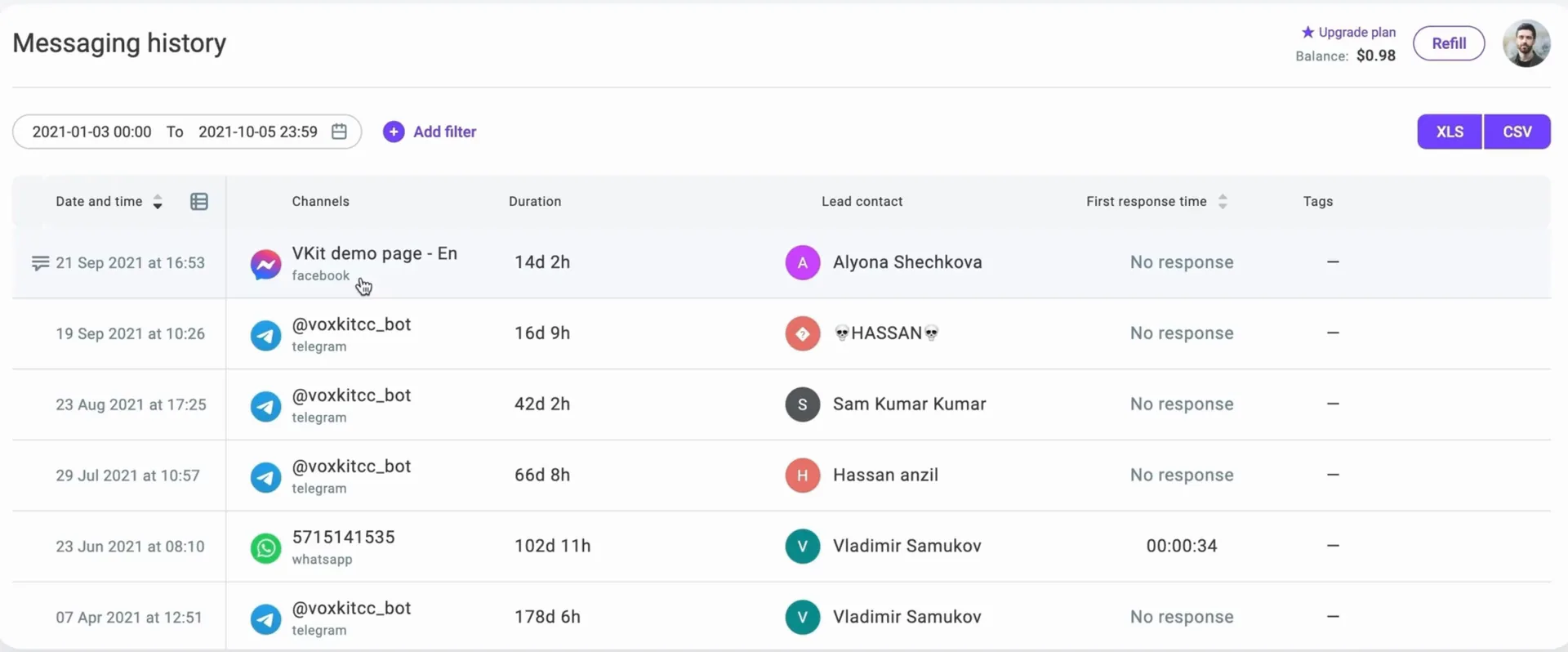
A searchable log of every chat. Filter by date, queue, channel or tag, see the lead contact and first response time, and export to XLS or CSV.
Reports
- Reports by agent, queue, channel and tag, plus a busiest-time heat map for planning shifts.
- Conversation tags are included, so topics like billing questions can be tracked over time. All reports export to XLS and CSV.


Design system
- Every component was built as an interactive block with all its states — focus, hover, press, error, disabled — and connected to the others.
- Over time this became the Kit Design Library with usage guidelines.


Impact
Kit in numbers
Results from Voximplant Kit, a product I designed from scratch and took to launch.
- 4.8/5rating on G2
- Voximplant Kit, verified user reviews
- 20Kcalls automated per month
- Skyeng's outbound campaigns, with a 17% increase in call volume
- ≤ 30 minto launch a contact center
- self-serve, without engineers
- 80%of routine calls can be automated
- with AI and IVR scenarios
- 5enterprise clients in production
- Rappi, KFC, Burger King, Hyundai, Jaguar
- 10+designers led
- across product, brand and web, plus a research function
For the business
- Kit became one of Voximplant's two product lines.
- Companies that needed months and a development team to set up a contact center now do it themselves in 30 minutes or less.
For the team
- As Kit grew, the design team grew with it.
- I led a team of 10+ across product, brand and web, and started a research function.